
Every playback problem in Jellyfin comes back to this one idea, and almost every setting in the Playback section is about it. Ten minutes here saves a lot of guessing later.
A video file is a box with things in it
A file like Arrival (2016).mkv is a container, and the container holds
separate streams: a video stream, one or more audio streams, sometimes
subtitles.
The container is the box. MKV, MP4, AVI. The streams inside are encoded in their own formats: H.264 or HEVC or AV1 for the video, AAC or AC3 or DTS for the audio.
A device can play a file when it understands the box and everything in it. When it does not, something has to change on the way, and which thing changes is the whole subject.
The three ways a film reaches you
Direct play
Your device understands the file, so the server sends it untouched. No processing, no quality loss, almost no load on the server. Playback starts immediately. This is the good one.
Direct stream
Your device understands the video but not the box, or not one of the audio tracks. The server repackages, leaving the video alone and changing only what it has to. The picture is untouched, the server does a little work. Nearly as good.
Transcoding
Your device cannot play the video itself, so the server decodes it and encodes a new one. This is expensive and it is lossy: the new video is made from the decoded old one, so it cannot be better and always is worse.

Note
Transcoding is not a bug. It is what makes a file playable on a device that otherwise could not play it at all, and sometimes it is the only option. The problem is when it happens and did not need to.
What transcoding actually costs
Quality
The new video is encoded from the decoded original, in real time, under a deadline. Real-time encoding is much worse than the unhurried encoding your file got. Fine detail goes, gradients band, dark scenes turn blocky.
Processor
A single 4K transcode can saturate a mid-range machine. Two at once will beat most home servers. The fans come on and everything else on that machine slows down.
Time
Playback waits for the transcode to build a buffer before it starts, and seeking often means starting again from the new position.
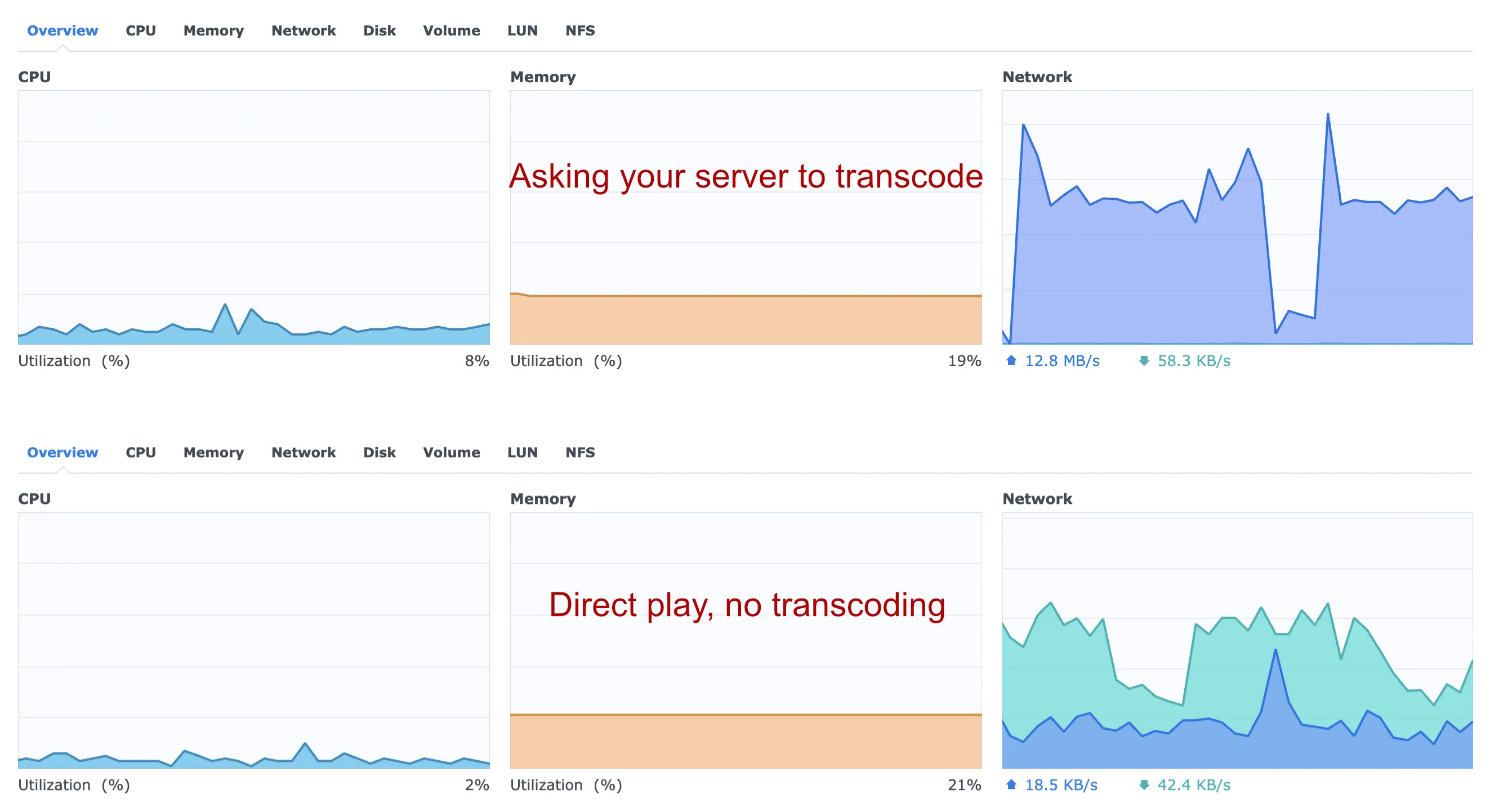
Electricity, continuously, for as long as somebody is watching. The below example is of the same file playing using 4x less CPU power when direct playing through JellyMold vs being asked to transcode via Swiftin in this example, costing you more money to play back every piece of your media.
Tip
Hardware acceleration helps with the processor and the fans. It does not make a transcode look like the original, because the quality loss is in the idea rather than the implementation. Avoiding the transcode is always better than accelerating it.
Find out which one you are getting
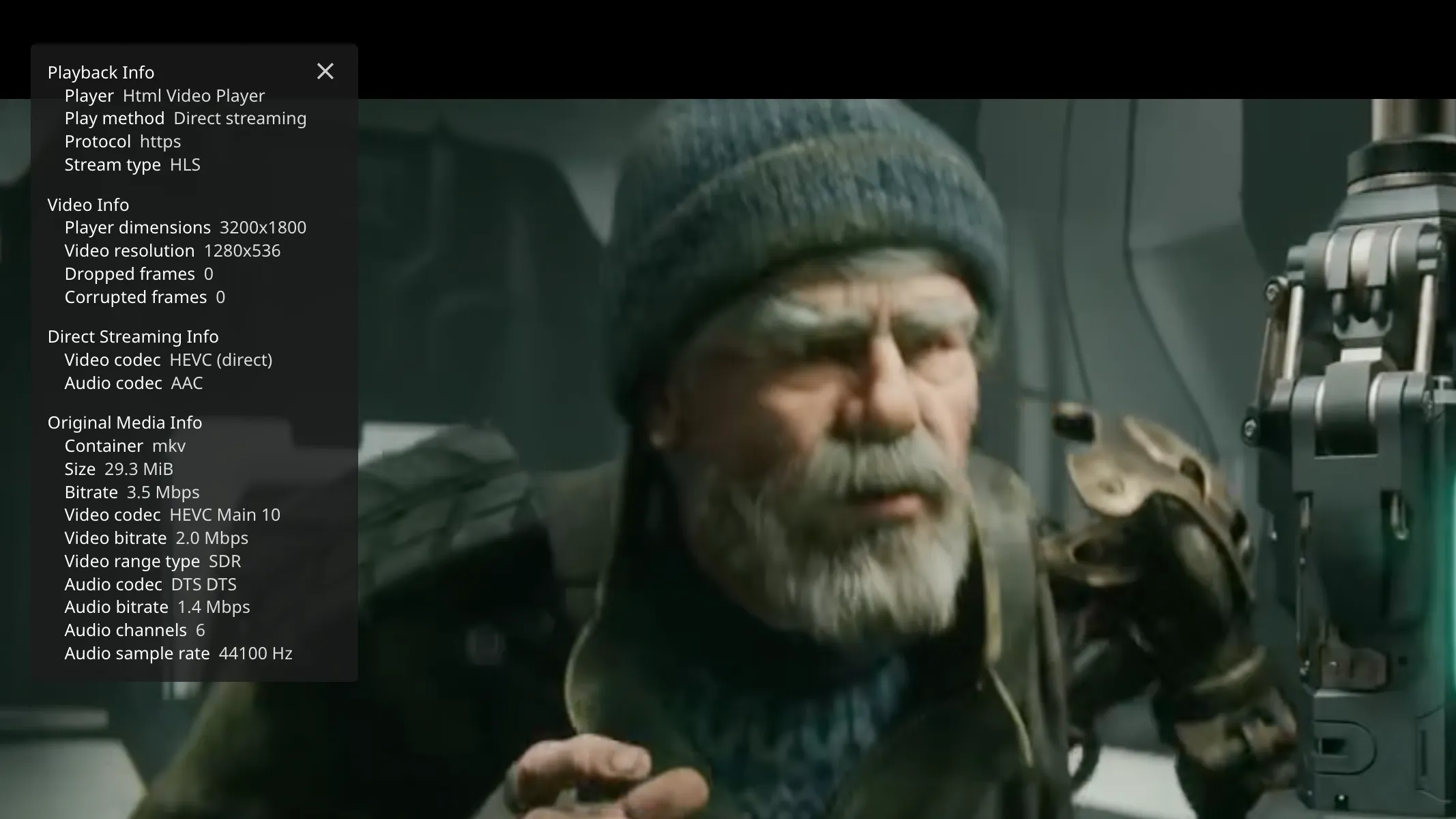
While something is playing in the web interface, open the playback info overlay. It names the method in plain language: Direct Play, Direct Stream, or Transcode with a reason attached.
The reason is the useful part. It will say something like the audio codec is not supported, or the container is not supported, and that tells you exactly what to change.
Server-side, Dashboard then Devices shows what every active session is doing at once, which is the place to look when the server is working hard and you do not know who is asking it to.

Direct stream looks much the same, with one section more. The video codec is marked direct, because that stream is being passed through untouched, while the audio beside it has been rebuilt into something the client can take.
Why the same file behaves differently on different devices
Because the answer depends entirely on the device.
A modern television usually handles HEVC, most containers and most audio formats, and direct plays nearly everything.
A browser is the most limited client there is. It supports a short list of formats and transcodes a great deal. Judging your server by how it behaves in a browser tab will give you a very pessimistic picture.
An iPhone or iPad sits in between, and predictably so: there is a defined list of what Apple hardware decodes natively, and a file inside that list direct plays every time. What an iPhone and iPad can play without transcoding is that list.
The app matters as much as the hardware. A client that asks the server to transcode by default will transcode even when the device could have played the file.
Note
JellyMold asks for the file as it is and decodes it on the device. That is the whole design: your server stays cool, the picture is the picture you own, and playback starts straight away.
Three things that force a transcode unnecessarily
A bitrate limit set too low
Clients often ship with a quality cap. Set below your file’s bitrate, it forces a transcode on a file the device could have played. Set it to maximum on your own network.
Subtitle formats that have to be drawn on
Text subtitles are sent alongside the video and rendered by the player. Image-based subtitles, the kind ripped from discs, often have to be burned into the picture, and burning them in means transcoding the whole film. Set up OpenSubtitles is the cheapest fix: an external text subtitle avoids the problem entirely.
One unsupported audio track
A film with DTS-HD audio may transcode everything because of the sound. Often the same file has a second, simpler audio track that would have direct played, and selecting it is all it takes.